← View series: ibm ai engineering
~/blog
Simple Data Set

Simple Dataset
Objective
- How to create a dataset in pytorch.
- How to perform transformations on the dataset.
Table of Contents
In this lab, you will construct a basic dataset by using PyTorch and learn how to apply basic transformations to it.
Estimated Time Needed: 30 min
Preparation
The following are the libraries we are going to use for this lab. The torch.manual_seed() is for forcing the random function to give the same number every time we try to recompile it.
# These are the libraries will be used for this lab.

import torch
from torch.utils.data import Dataset
torch.manual_seed(1)
Simple dataset
Let us try to create our own dataset class.
# Define class for dataset

class toy_set(Dataset):

    # Constructor with defult values
    def __init__(self, length = 100, transform = None):
        self.len = length
        self.x = 2 * torch.ones(length, 2)
        self.y = torch.ones(length, 1)
        self.transform = transform

    # Getter
    def __getitem__(self, index):
        sample = self.x[index], self.y[index]
        if self.transform:
            sample = self.transform(sample)
        return sample

    # Get Length
    def __len__(self):
        return self.len
Now, let us create our toy_set object, and find out the value on index 1 and the length of the inital dataset
# Create Dataset Object. Find out the value on index 1. Find out the length of Dataset Object.

our_dataset = toy_set()
print("Our toy_set object: ", our_dataset)
print("Value on index 0 of our toy_set object: ", our_dataset[0])
print("Our toy_set length: ", len(our_dataset))
As a result, we can apply the same indexing convention as a list,
and apply the fuction len on the toy_set object. We are able to customize the indexing and length method by def __getitem__(self, index) and def __len__(self).
Now, let us print out the first 3 elements and assign them to x and y:
# Use loop to print out first 3 elements in dataset

for i in range(3):
    x, y=our_dataset[i]
    print("index: ", i, '; x:', x, '; y:', y)
The dataset object is an Iterable; as a result, we apply the loop directly on the dataset object
for x,y in our_dataset:
    print(' x:', x, 'y:', y)
Practice
Try to create an toy_set object with length 50. Print out the length of your object.
# Practice: Create a new object with length 50, and print the length of object out.

# Type your code here
Double-click here for the solution.
Transforms
You can also create a class for transforming the data. In this case, we will try to add 1 to x and multiply y by 2:
# Create tranform class add_mult

class add_mult(object):

    # Constructor
    def __init__(self, addx = 1, muly = 2):
        self.addx = addx
        self.muly = muly

    # Executor
    def __call__(self, sample):
        x = sample[0]
        y = sample[1]
        x = x + self.addx
        y = y * self.muly
        sample = x, y
        return sample
Now, create a transform object:.
# Create an add_mult transform object, and an toy_set object

a_m = add_mult()
data_set = toy_set()
Assign the outputs of the original dataset to x and y. Then, apply the transform add_mult to the dataset and output the values as x_ and y_, respectively:
# Use loop to print out first 10 elements in dataset

for i in range(10):
    x, y = data_set[i]
    print('Index: ', i, 'Original x: ', x, 'Original y: ', y)
    x_, y_ = a_m(data_set[i])
    print('Index: ', i, 'Transformed x_:', x_, 'Transformed y_:', y_)
As the result, x has been added by 1 and y has been multiplied by 2, as [2, 2] + 1 = [3, 3] and [1] x 2 = [2]
We can apply the transform object every time we create a new toy_set object? Remember, we have the constructor in toy_set class with the parameter transform = None.
When we create a new object using the constructor, we can assign the transform object to the parameter transform, as the following code demonstrates.
# Create a new data_set object with add_mult object as transform

cust_data_set = toy_set(transform = a_m)
This applied a_m object (a transform method) to every element in cust_data_set as initialized. Let us print out the first 10 elements in cust_data_set in order to see whether the a_m applied on cust_data_set
# Use loop to print out first 10 elements in dataset

for i in range(10):
    x, y = data_set[i]
    print('Index: ', i, 'Original x: ', x, 'Original y: ', y)
    x_, y_ = cust_data_set[i]
    print('Index: ', i, 'Transformed x_:', x_, 'Transformed y_:', y_)
The result is the same as the previous method.
# Practice: Construct your own my_add_mult transform. Apply my_add_mult on a new toy_set object. Print out the first three elements from the transformed dataset.

# Type your code here.
Double-click here for the solution.
Compose
You can compose multiple transforms on the dataset object. First, import transforms from torchvision:
# Run the command below when you do not have torchvision installed
# !mamba install -y torchvision

from torchvision import transforms
Then, create a new transform class that multiplies each of the elements by 100:
# Create tranform class mult

class mult(object):

    # Constructor
    def __init__(self, mult = 100):
        self.mult = mult

    # Executor
    def __call__(self, sample):
        x = sample[0]
        y = sample[1]
        x = x * self.mult
        y = y * self.mult
        sample = x, y
        return sample
Now let us try to combine the transforms add_mult and mult
# Combine the add_mult() and mult()

data_transform = transforms.Compose([add_mult(), mult()])
print("The combination of transforms (Compose): ", data_transform)
The new Compose object will perform each transform concurrently as shown in this figure:
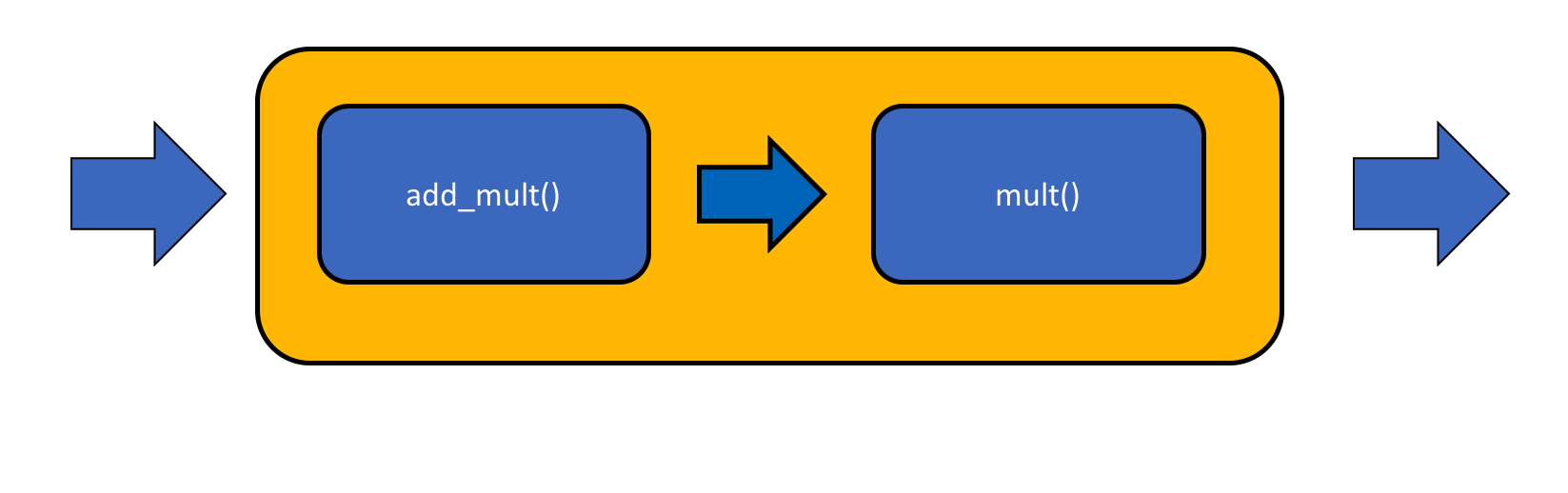 Compose PyTorch
data_transform(data_set[0])x,y=data_set[0]
x_,y_=data_transform(data_set[0])
print( 'Original x: ', x, 'Original y: ', y)
print( 'Transformed x_:', x_, 'Transformed y_:', y_)Now we can pass the new Compose object (The combination of methods add_mult() and mult) to the constructor for creating toy_set object.
# Create a new toy_set object with compose object as transform

compose_data_set = toy_set(transform = data_transform)
Let us print out the first 3 elements in different toy_set datasets in order to compare the output after different transforms have been applied:
# Use loop to print out first 3 elements in dataset

for i in range(3):
    x, y = data_set[i]
    print('Index: ', i, 'Original x: ', x, 'Original y: ', y)
    x_, y_ = cust_data_set[i]
    print('Index: ', i, 'Transformed x_:', x_, 'Transformed y_:', y_)
    x_co, y_co = compose_data_set[i]
    print('Index: ', i, 'Compose Transformed x_co: ', x_co ,'Compose Transformed y_co: ',y_co)
Let us see what happened on index 0. The original value of x is [2, 2], and the original value of y is [1]. If we only applied add_mult() on the original dataset, then the x became [3, 3] and y became [2]. Now let us see what is the value after applied both add_mult() and mult(). The result of x is [300, 300] and y is [200]. The calculation which is equavalent to the compose is x = ([2, 2] + 1) x 100 = [300, 300], y = ([1] x 2) x 100 = 200
Practice
Try to combine the mult() and add_mult() as mult() to be executed first. And apply this on a new toy_set dataset. Print out the first 3 elements in the transformed dataset.
# Practice: Make a compose as mult() execute first and then add_mult(). Apply the compose on toy_set dataset. Print out the first 3 elements in the transformed dataset.

# Type your code here.
Double-click here for the solution.

About the Authors:
Joseph Santarcangelo has a PhD in Electrical Engineering, his research focused on using machine learning, signal processing, and computer vision to determine how videos impact human cognition. Joseph has been working for IBM since he completed his PhD.
Other contributors: Michelle Carey, Mavis Zhou